
To receive your HU identification card, you must first submit a passport-style photo. We realize that poses and expressions are challenging so listed below are detailed instructions along with sample photos necessary for submitting your Hampton University Identification photo. When taking your photo, please use the 10-steps below as guidelines to ensure your photo is accepted:
Photo Identification Requirements:
- For best results, please submit a passport-style photo: a clear, front-facing image with a plain background, no filters, and no hats or sunglasses.
- Use a clear image of your face. Do not use filters commonly used on social media.
- Submit one color photo taken in the last 12 months.
- Have someone else take your photo. No selfies.
- Submit a high-resolution photo that is not blurry, grainy, or pixelated.
- Do not digitally change the photo.
- Take off your eyeglasses for your photo.
- Use a white or off-white background without shadows, texture, or lines.
- Have a neutral facial expression with both eyes open and mouth closed or with slight smile.
- Face the camera with a neutral expression. Your head and face must squarely face the camera and be centered in the photo frame. (no tilt or side profile allowed).

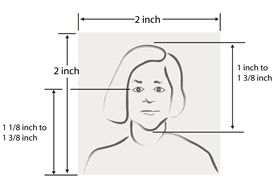



The first photo on the top row represents an acceptable photo. Notice that it is very similar in size and requirements to a passport photo and the background is white or off white. The photos on the second row do not have a white or off white background and are unacceptable for Hampton University Identification cards. Failure to submit an acceptable photo using the required format will disrupt student onboarding and limit access to on campus facilities and other venues.
Photo Agreement and Instructions
I agree to provide my image to Hampton University for identification purposes. I assent to the use of my photo being reproduced and provided to the university administration to assist in security. I fully understand that not having official Hampton University identification may restrict my access privileges to campus facilities and grounds.
Photo Basics
You will be submitting a head and shoulders photo online this year so we can produce your HU ID card for the fall semester. Please review the guidelines below to submit your photos.
Note: Your photo MUST meet the necessary requirements in order to be accepted as your Student ID Photo. Otherwise, you may be asked to resubmit a photo for your Student ID.
- Submit a recent digital color photo. The photo may be taken with any device that can produce a digital photo.
- Use a clear image of your face. Do not use filters commonly used on social media.
- Have someone else take your photo. No selfies.
- Use a solid colored wall as your background. A lighter color that provides appropriate contrast is preferred.
- You should be the only person in the photo.
- Do not digitally alter the photo.
- Have a neutral facial expression or a natural smile, with both eyes open.
- Face the camera directly with full face view. Do not tilt your head.
- Do not wear headphones or wireless hands-free devices.
- You can wear jewelry and keep on your facial piercings as long as they do not hide your face.
- Do not wear a hat or head covering.
- Students seeking approval to wear headgear as an expression of religious or cultural dress may make a written request for a review through the Office of the Chaplain (debra.haggins@hamptonu.edu).
- The Chaplain will forward the recommendation to the Vice President for Administrative Services for final approval.
- Students who are approved may then submit an ID card picture with the headgear on.
Too Close – Should Be Head and Shoulders Wrong Background – Should be Solid Color Too Far – Should be Head and Shoulders Best positioning
Resolution / Print Size / Quality
- Submit a high resolution photo that is not blurry, grainy, or pixelated.
- Accepted file formats are BMP, JPG, JPEG, and PNG. File size must be 500KB (kilobytes) or less. Tips
- If you’re taking a photo with a cell phone, hold the phone vertically.
- You can use any recent photo that fits the requirements above. Digitally unaltered school photos or passport photos are likely to work, but they must have been taken recently.
- If you have a physical copy of a photo you want to use,you can scan it onto a computer and use the picture. However, the photo scan must be high quality and clear.
- You need to be easily identifiable in your picture.
- If your file size is too large, you can try these tips:
- If you’re using your phone, adjust the Camera app settings to take medium quality photos, instead of high quality. Use an online image optimizer/compressor website, like imagecompressor.com
Your ID card gets you access to campus buildings, dining, and a smooth check in during New Student Orientation. Skipping this step or missing the deadline could lead to long delays when you arrive.
We’re working hard to make your move-in experience fast and stress free – and this is one simple way you can help make that happen. If you have any questions or need help, just email us at HUPDPhoto@hamptonu.edu.