
STUDENT REFUNDS
For the fastest way to receive a refund, students should create a direct deposit through
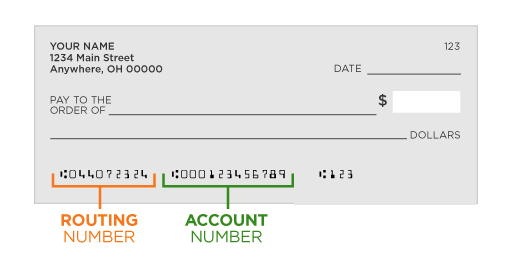
MyCampus Portal to have your refund deposited directly to the bank account of your choice. You will need the routing number and account number for the checking or savings account; you CANNOT use your debit card number.
After creating an account, it takes three business days before the bank account is ready to accept ACH deposits. In order for a student to have their refund reviewed and generated, a student must create their e-Refund account one week prior to the first day of the term beginning. Students may sign up for direct deposit at any time.
If a student enters an incorrect routing and/or account number or the bank account is frozen or closed, it may take up to 10 business days before we receive the funds back from the bank. The student should make corrections to the bank account by deleting the incorrect account and entering the correct information.
Note: Any direct deposit authorizations submitted to the Payroll Office as an employee is a separate process for the direct deposit authorization. For Student related refunds, you must follow the instructions provided above.
ENROLL IN STUDENT DIRECT DEPOSIT FOR ELECTRONIC REFUNDS
Enroll in Student Direct Deposit for Electronic Refunds
The fastest way to receive your refund is to enroll in Direct Deposit (eRefunds) through the MyCampus Portal. Funds are deposited directly into your checking or savings account — no waiting for paper checks.
Benefits of eRefunds
-
Convenience: No mail delays — funds go straight to your account.
-
Quick Access: Processed several times a week; available 1–3 business days after disbursement.
-
Safety: Eliminates the risk of lost or stolen checks.
-
Important: Payroll Office direct deposit for employees is separate from student eRefunds. Follow the instructions below for student refunds.
IMPORTANT INFORMATION BEFORE YOU ENROLL IN DIRECT DEPOSIT
-
Have your bank routing number and checking or savings account number ready.
-
Do not use your debit card number or the check number.
-
Once enrolled, it takes three business days before your account can receive ACH deposits.
-
To avoid delays, set up your account at least one week before the first day of the term.
-
Incorrect or closed account information can delay your refund up to 10 business days.
How to Enroll in Direct Deposit
-
Go to: MyCampus Portal
-
Click Student Secured Log In
-
Enter your Student User ID and PIN, then click Login
-
Forgot PIN? Enter your HUID and select Forgot PIN? to reset
-
-
On the Main Menu, click Student
-
Select Student Account
-
Click Student Account – PiratePay Portal
-
Click Enter PiratePay Portal
-
For First-time users – Be Sure to Set up your Security Settings (two-factor authentication)
-
Return to the homepage and click Electronic Refunds
-
Enter your demographic information, routing number, and account number – PLEASE Double-check all information before submitting
Paper Checks –
-
Mailed once a week only — no in-office pick-up available.
-
Ensure your home address is correct with Hampton University to avoid delays.
- Reconsider the Direct Deposit Options for quicker access to your eligible refund.
ISSUANCE OF PAPER CHECKS
If you do NOT sign up for direct deposit, a check will be printed and mailed to the mailing address listed on your student account. For students who do not receive their refund checks in a timely manner, a stop payment (initiated through the Student Business Services Office) cannot be processed until 2 weeks from the mail date of the check. The stop payment, re-issuance, and mailing of the replacement check takes approximately 10 days. It is recommended that you sign up for direct deposit to avoid this possible 3-4 week delay.
FEDERAL PLUS LOANS - PLUS LOAN APPLICATION OF PAYMENT TO STUDENT’S ACCOUNT
Federal PLUS loans are for graduate/professional students and parents of dependent undergraduate students. Borrowers can use PLUS loans to help meet the cost of attendance or cover a student’s expected family contribution (the amount of money the government expects the parents and student to provide each year for the student’s education).
Per the Federal Guidelines on Federal PLUS loans, Hampton University will first apply the loan funds to the school account to pay for tuition, fees, room and board, and any other school charges. Any additional loan funds will be paid to the student as a credit balance (with your authorization) or sent to you (if the PLUS LOAN amount is greater than the overall cost of the tuition, fees, room and board). All loan funds must be used for education expenses.
If the Federal PLUS LOAN is greater than all of the total amount of the current semesters fees would a refund be issued to the person (Parent) who applied and was approved for the loan would receive a refund.
All other related financial aid (Federal student loans, grants or scholarships) are applied to the student account to cover any additional related costs for a student’s semester fees. At that time, any eligible refund would be issued to the student.